The automatic document capture has a 97% accuracy rate when determining if a document is an invoice. If one is missed, you can always upload it manually
inBox (Admin)
Last updated: December 24, 2025
New Invoices
If you have automatic email extraction enabled invoices will populate in the inbox from incoming email attachments.
💡 The extraction tool has a 97% accuracy rate when determining if a document is an invoice.
Manually upload invoices by selecting ☁️ Upload:
Drag and drop documents into the popup area.
Click to upload from the folders on your computer.
Upload multiple documents at one time.
Bulk Edits
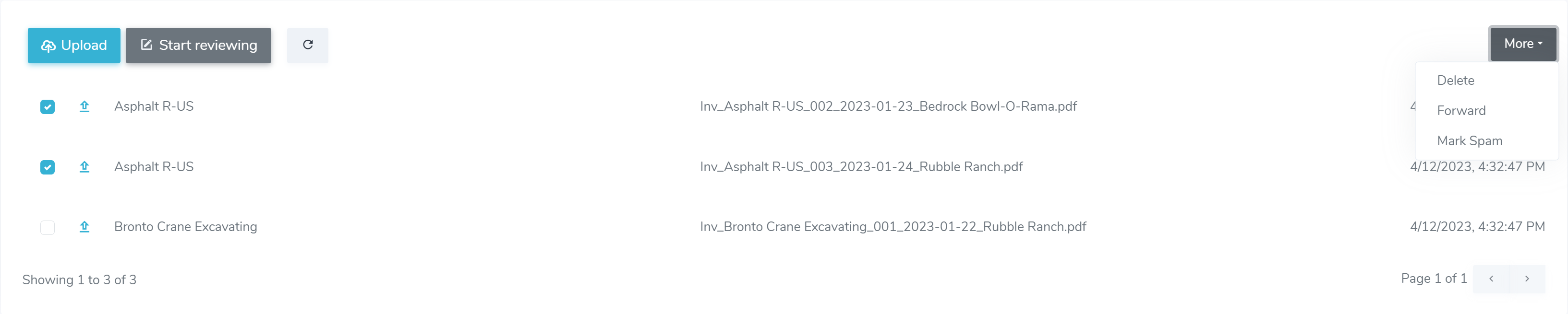
You can take action on the invoices all at once by using the checkboxes on the left:
Click on the specific invoices checkboxes you want to change.
Select the dropdown ⏬ More.
Choose the action you wish. You can Delete, Forward, or Mark as Spam.
Quick Actions

Hover over an invoice to see the quick actions on the right side:
👁️🗨️ will allow you to quickly View the invoice document.
🗑️ will Delete the individual invoice.
📝 will bring you to the invoice to review and Edit.
💡 The inbox for team members with Admin permissions is different than the inbox for those with Manager permissions.
FAQs
How does the system know a document is an invoice?
Will invoices be entered into a project without a human review?
The inbox for Admins can be thought of as a gatekeeper where no invoice will pass unless they are submitted by a human.
What if an invoice is illegible?
On the off chance our smart data extraction cannot pull information off the invoice then the Admin would need to manually enter each field by editing the invoice.